.avif)
TL;DR
- Sendpilot combines lead sourcing, ICP scoring, automated LinkedIn campaigns, and a unified inbox into one platform built for agencies and GTM teams.
- The AI messaging goes beyond basic merge fields, pulling real context from a prospect's profile to write icebreakers that don't read like a template.
- Pricing scales by sender, not by seat, which changes the math fast once you're running more than one or two LinkedIn accounts.
- SalesRobot is worth a look if you want LinkedIn and email running in a single sequence instead of two separate tools.
Is This LinkedIn Automation Tool Worth The Hype?
Picture this: you've got a list of 500 ideal prospects, and the plan is to reach every single one of them without sounding like a bot or spending your entire week doing it manually.
That's the exact problem Sendpilot was built to solve.
It bundles lead finding, scoring, outreach automation, and inbox management into one dashboard, then adds AI on top to handle the personalization at scale.
But does bundling everything into one platform actually make outreach easier, or does it just move the complexity somewhere else?
In this review, we'll break down Sendpilot's features, pricing, and where it holds up (and where it doesn't), then look at SalesRobot as an alternative if LinkedIn-only outreach isn't enough for what you're trying to do.
Sendpilot.ai: What You Need to Know
✅ AI messaging that pulls real context, not just merge fields: Instead of dropping in {first_name} and {company} and calling it personalized, the AI reads a prospect's profile and recent activity to write an icebreaker that sounds like it took actual research, not five seconds.

✅ Works without LinkedIn Premium or Sales Navigator: You can connect a standard free LinkedIn account and start running campaigns, which lowers the barrier to entry compared to tools that assume you're already paying for LinkedIn's own upsells.

✅ The unified inbox genuinely replaces tab-juggling: Every conversation across every connected account lands in one thread. For anyone managing more than one LinkedIn profile, this alone cuts out a meaningful chunk of the daily grind.

✅ ICP scoring filters leads before you waste a message on them: Prospects get scored against your ideal customer profile using firmographics like title, seniority, and company size, so low-fit contacts get filtered out before outreach goes out, not after.
⚠️ You can pause a whole campaign, but not one lead inside it: If you want to hold off on a single prospect mid-sequence, there's currently no way to do that without pausing the entire campaign.

⚠️ Credits run out faster than the sticker price suggests: The entry tier ships with a capped monthly credit pool. Run more than one campaign across different audiences and you can burn through that allocation before the month's up.

⚠️ Analytics stay fairly surface-level: You get open rates and reply rates, but understanding what's actually driving those replies (which message, which variable, which sequence step) takes more digging than the dashboard currently offers.

⚠️ Some rough edges show up at scale: Occasional slow loading, small bugs, and a lead-export flow with a few more clicks than it needs are the kind of things you'd expect from a platform that's still growing fast.

Sendpilot's Key Features, Broken Down
Lead Finder & Enrichment

Sendpilot gives you access to a database of 300M+ verified contacts, or you can import your own lists.
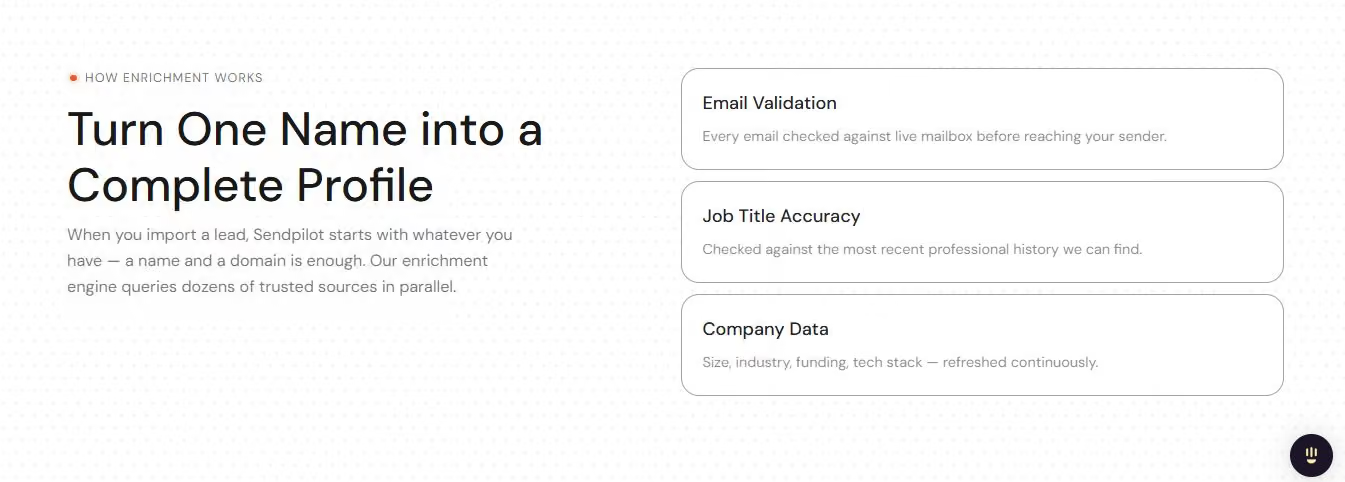
Every lead that comes through gets enriched with current contact and company data automatically, so you're not starting outreach with half a profile.
ICP Scoring
Every prospect gets scored against your ideal customer profile using filters like job title, seniority, department, and location.

The platform surfaces the leads most likely to actually engage and quietly filters out the ones that don't fit, before you spend a single message on them.
Unlimited Senders
You can connect as many LinkedIn accounts as your plan allows and rotate outreach across them automatically.
The platform's own benchmark: with 10 premium accounts running, you can push out roughly 2,000 connection requests a week while staying within safe per-account limits.
Automated Campaign Builder
A visual workflow builder lets you chain together connection requests, follow-ups, messages, voice notes, and profile views, with conditional logic like "if connected" or "if ICP score is above X" to route each lead down the right path automatically.
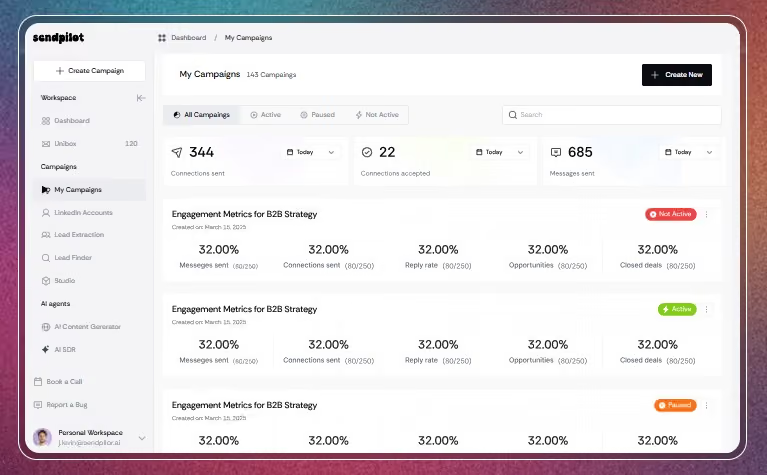
Unified Inbox
Every reply from every connected account shows up in one place. You can respond directly from Sendpilot on behalf of any account without switching between LinkedIn logins.
Sendpilot.ai Pricing: How Much Will It Cost?

Sendpilot scales its pricing by number of senders (LinkedIn accounts) rather than by team seat.
Solo
Includes unified inbox, voice notes, data enrichment, and lead database access. Built for individuals running outreach off a single LinkedIn account. The per-sender cost jumps quickly if you add a second one, since it's priced the same as the first.
Team
Everything in Solo, plus API and webhooks, MCP server access, and the option to bring your own proxies. This is where the per-sender economics start looking more reasonable, since the cost per additional account drops once you're past the entry tier.
Agency (Most Popular)
Everything in Team, plus whitelabeling, 1-on-1 onboarding, and a dedicated Slack channel. Aimed squarely at agencies managing outreach across multiple client accounts, with the lowest per-sender cost of any published tier.
Enterprise
Everything in Agency, plus custom pricing, advanced features, and dedicated account support. For large teams that have outgrown the Agency tier's structure.
Sendpilot offers a free trial with no credit card required, so you can test the platform before committing to a plan, and currently runs a limited-time offer of two months free on annual billing.
Sendpilot.ai vs SalesRobot: How Do They Compare?
Choose Sendpilot if LinkedIn is your only outbound channel and you want lead sourcing, scoring, and outreach bundled into one platform.
Pick SalesRobot if you want that same LinkedIn automation but need email running in the same sequence, not a separate tool bolted on afterward.
SalesRobot: When LinkedIn Alone Isn't Enough

If LinkedIn is only part of your outreach mix, SalesRobot is worth putting next to Sendpilot before you decide.
What SalesRobot Actually Does
SalesRobot runs LinkedIn connection requests, messaging sequences, and cold email from a single platform, all in the cloud using mobile APIs rather than browser automation.
That's built specifically for teams who don't want to run LinkedIn through one tool and email through another and then try to stitch the two together manually.
Key Features
- Multi-Channel Sequences: Combine LinkedIn connection requests, messages, InMails, and cold email in one unified campaign that follows a prospect across channels.
- AI-Powered Voice and Video Messages: Send personalized voice notes and video messages directly through LinkedIn to stand out in a crowded inbox.
- AI Appointment Setter: An AI SDR agent that manages your inbox automatically, replying to leads and booking meetings without manual follow-up.
- Mobile API Safety: Runs on LinkedIn's mobile app APIs instead of browser-based automation, which keeps activity patterns closer to natural usage.
- Advanced Targeting: Import prospects from LinkedIn Search, Sales Navigator, event attendee lists, post commenters, or group members.
SalesRobot Pricing
SalesRobot prices per LinkedIn account across three main tiers, with a 35% off discount for annual billing.
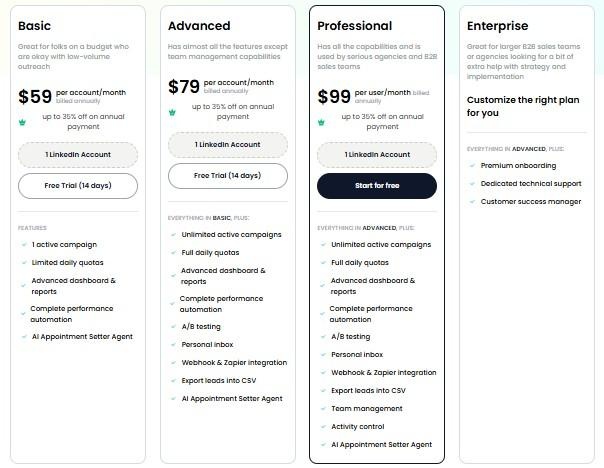
Basic: $59/month per LinkedIn account ($39/month billed annually) one active campaign, limited daily quotas, includes the AI Appointment Setter.
Advanced: $79/month per LinkedIn account ($59/month billed annually) unlimited campaigns, full daily quotas of 75 connections and 50 InMails/day, Zapier integration, CSV export.
Professional: $99/month per LinkedIn account everything in Advanced, plus team management and activity control across accounts.
SalesRobot offers a 14-day free trial with no credit card required.
The Verdict
Sendpilot is a genuinely capable LinkedIn platform if LinkedIn is the only channel you need.
The AI personalization holds up, the ICP scoring does real filtering work, and the unified inbox solves a real problem for anyone managing multiple accounts.
Where it gets more complicated is the per-sender pricing and the credit system.
Neither is unreasonable on its own, but together they mean your actual monthly cost depends heavily on how many accounts and how much volume you're running, more than the advertised starting price suggests.
Bottom Line
Go with Sendpilot if LinkedIn is your entire outbound motion and you want lead sourcing, scoring, and automation in one place.
Look at SalesRobot instead if you need that same LinkedIn automation to run alongside email in a single sequence, without adding a second platform to your stack.
Frequently Asked Questions
Does Sendpilot support email outreach?
No. Sendpilot is built specifically for LinkedIn. If you want a single sequence that moves a prospect from a LinkedIn connection request into a cold email follow-up, you'll need to pair it with a separate email tool or use a platform that runs both channels natively, like SalesRobot.
How does Sendpilot's credit system actually work?
Each plan includes a fixed number of credits per sender per month (800 on the published tiers). Credits get used up as you run outreach actions across your connected accounts, so the more campaigns and volume you're running, the faster they deplete.
Can I pause outreach to just one lead without stopping the whole campaign?
Not currently. Sendpilot's pause controls work at the campaign level, so stopping outreach to a single prospect mid-sequence means pausing everyone else in that campaign too.
Do I need LinkedIn Premium or Sales Navigator to use Sendpilot?
No. A standard free LinkedIn account is enough to connect and run campaigns, though Sales Navigator can expand your targeting options if you already have it.
Does SalesRobot offer the same lead database Sendpilot does?
Not in the same way. SalesRobot focuses on importing prospects directly from LinkedIn Search, Sales Navigator, CSV uploads, event attendee lists, and post engagement, rather than maintaining its own standalone contact database.
Is SalesRobot cheaper than Sendpilot?
It depends on how many LinkedIn accounts you're running. SalesRobot's per-account pricing ($39–$99/month depending on tier and billing) can come out lower than Sendpilot's per-sender model once you factor in Sendpilot's additional-sender costs, but the right comparison depends on your specific setup and volume.

Wow your leads by cloning yourself and sending personalized videos and voice notes to each lead on LinkedIn.
If you don't reply to leads within 5 mins, your chances of converting them fall by 50%. Our AI replies on your behalf instantly! (and yes, you can train it)

Don't shoot in the dark. Get detailed analytics on what's working

SalesRobot allows you to invite other team members, so that they can add their LinkedIn Account, run outreach campaigns and get amazing results just like you.
.avif)


Trusted by 4100+ innovative B2B sales teams and lead gen agencies

.avif)

.avif)




.avif)


Heading 1
Heading 2
Heading 3
Heading 4
Heading 5
Heading 6
Lorem ipsum dolor sit amet, consectetur adipiscing elit, sed do eiusmod tempor incididunt ut labore et dolore magna aliqua. Ut enim ad minim veniam, quis nostrud exercitation ullamco laboris nisi ut aliquip ex ea commodo consequat. Duis aute irure dolor in reprehenderit in voluptate velit esse cillum dolore eu fugiat nulla pariatur.
Block quote
Ordered list
- Item 1
- Item 2
- Item 3
Unordered list
- Item A
- Item B
- Item C
Bold text
Emphasis

Superscript
Subscript