.avif)
TL;DR
Skylead is a cloud-based LinkedIn and email outreach tool designed for B2B sales and lead generation. It combines LinkedIn automation, email sequences, smart multichannel flows, and personalized content to help streamline prospecting and increase meetings booked.
Key points about Skylead:
- Pricing: $100/seat/month with only a 7-day free trial (limited time to test)
- Pros: Smart Sequences with If/Else conditions, email discovery and verification included, image and GIF personalization, good customer support
- Cons: LinkedIn TOS concerns, technical bugs and glitches, a clunky interface with a steeper learning curve, limited Sales Nav integration (doesn’t work with LinkedIn inboxes), occasional campaign hiccups
- Features: Pre-tested templates, personalization variables, detailed analytics with A/B testing, a new AI SDR and B2B database (paid add-ons)
Bottom line: Skylead is a solid choice if your outreach strategy relies on both LinkedIn and email automation and you want a unified platform. If you want a lower starting price, AI-personalized voice and video messages, or a longer free trial, you may want to compare it with SalesRobot, which is also covered in this review.
This article is for you if…
You want to learn if Skylead can help generate more sales-ready leads for your business
OR
Perhaps you may be a Skylead customer that's been burnt and now you want an alternative tool that better meets your needs. .
Either way, you're in the right place!
This blog is tailor-made just for you.
In this comprehensive Skylead review, we'll dive deep into its:
🌟Price,
and
🌟What's the downsides of using Skylead?
We'll also hear from real customers about their experiences with Skylead.
But wait, there's more!
I'll give you the best Skylead alternative to help you achieve even better results.
With a wealth of information coming your way, it's time to buckle up and prepare for an in-depth Skylead review.
What is Skylead?
.jpeg)
Skylead is a cloud-based sales automation software that helps marketers/businesses gather potential leads.
By automating LinkedIn and Cold Email, Skylead simplifies the lead generation process by automating repetitive tasks, letting you focus on raking in more cash for your business.
However, it's important to note that Skylead operates in a gray area regarding LinkedIn's Terms of Service. Like most LinkedIn automation tools, it may violate LinkedIn's TOS, which prohibits automation and can result in account restrictions if detected.
How does Skylead work?
That covers what Skylead is, but how does it work exactly?
Step 1: At first, you need to connect your LinkedIn and email account

Step 2: Provide a LinkedIn URL or CSV file containing your prospect details
- Once your LinkedIn and email accounts are connected, you can load your prospects into Skylead by adding a LinkedIn URL or uploading a CSV file.
- Skylead uses this to automatically pull relevant contact details from your prospects’ LinkedIn profiles.
Step 3: Now you can create a campaign for LinkedIn and mail outreach
- You can now create a smart campaign using Skylead’s campaign builder.
- This lets you set your campaign goals, set up personalized connection requests, messages and follow-ups, and create cold email templates.


- You can customize the touchpoints for each prospect, tailoring your messaging to their needs and interests.
What are the features that Skylead offers?
Email and LinkedIn Automation
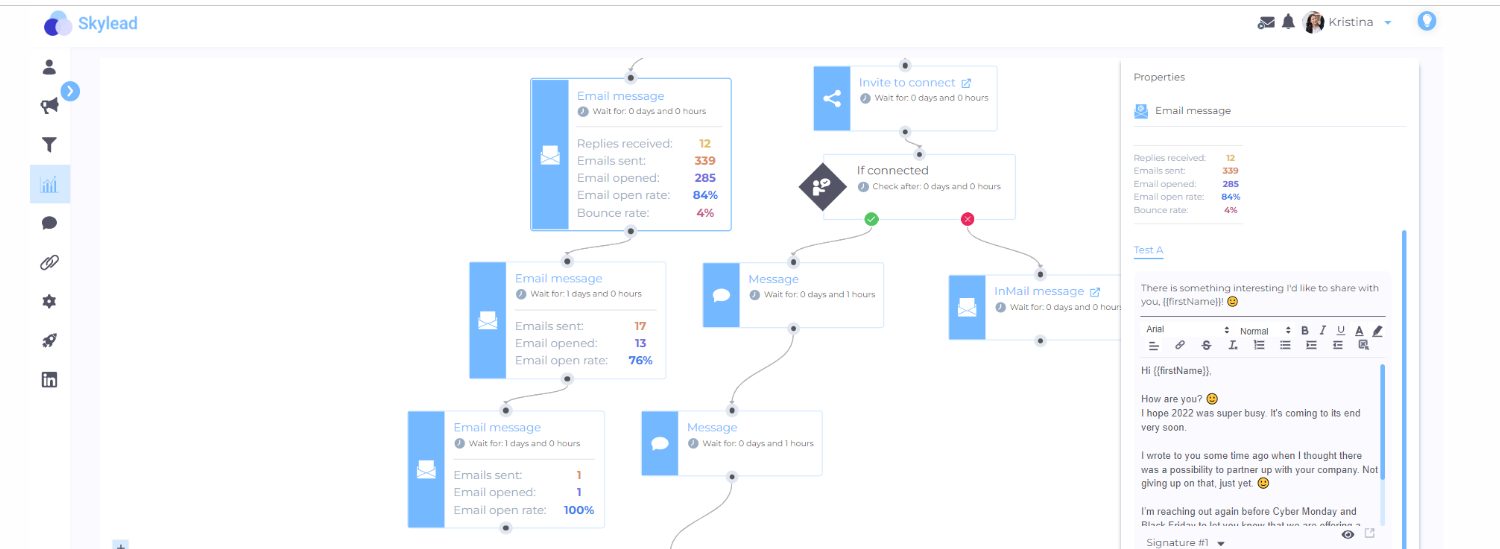
- Skylead’s Smart Sequences let you customize outreach actions based on how leads behave.

- If/Else conditions are what make Smart Sequences unique, letting actions change in real time.
- Pre-tested sequence templates and personalization variables save you time and effort.
- It helps you send 200-250 connection requests a week.
- Keep in mind that LinkedIn sets its own limits and may restrict accounts that look suspicious.

Email Discovery and Verifier
- Skylead finds and verifies prospects’ emails at no extra monthly cost, even without linked LinkedIn profiles.
Image & GIF Personalization
- Skylead automatically personalizes images and GIFs using each prospect’s profile info, saving you the manual work.

Reports and Insights
- Skylead gives you detailed, real-time insights with graph metrics, table views and sequence steps.

- You can analyze campaign metrics and A/B test your messaging to improve performance.

AI SDR and Prospecting (new in 2026)
In 2026, Skylead added account-based prospecting with AI data enrichment, a built-in B2B database, Post signals for finding leads by intent, and an AI SDR that handles replies and guides interested prospects toward booked meetings. AI data enrichment and AI SDR are paid add-ons.
Integrations
- Skylead integrates with HubSpot, Salesforce and Zapier, so your leads and activity can sync with the rest of your stack.
What is the pricing of Skylead?
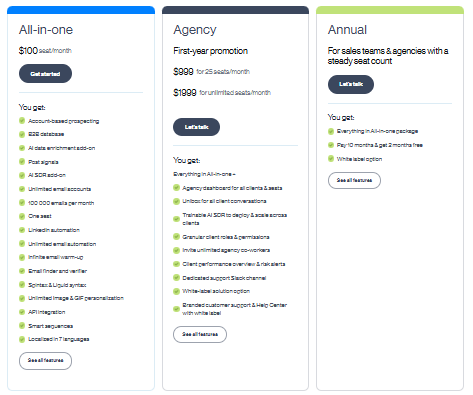
Skylead’s All-in-one plan costs $100 per seat per month.
For agencies, there’s an Agency plan, currently a first-year promotion at $999/month for 25 seats or $1,999/month for unlimited seats.
It adds an agency dashboard, a unified inbox for all client conversations, and a white-label option. Teams with a steady seat count can also pay annually: pay for 10 months and get 2 months free.
Skylead offers a 7-day free trial, giving you less time to determine whether the tool's right for your purposes.
Skylead Reviews: Here's what customers say about this tool!
Skylead Reviews on G2
The overall Skylead rating on G2 is 4.5 out of 5. Let's look into some of the positive and negative Skylead reviews on G2.
Positive Skylead Reviews on G2

Negative Skylead Reviews on G2

.jpeg)
Skylead Reviews on Capterra
The overall Skylead rating on Capterra is 4.8 out of 5. Let us look into some of the positive and negative Skylead reviews on Capterra.
Positive Skylead Reviews on Capterra

Negative Skylead Reviews on Capterra


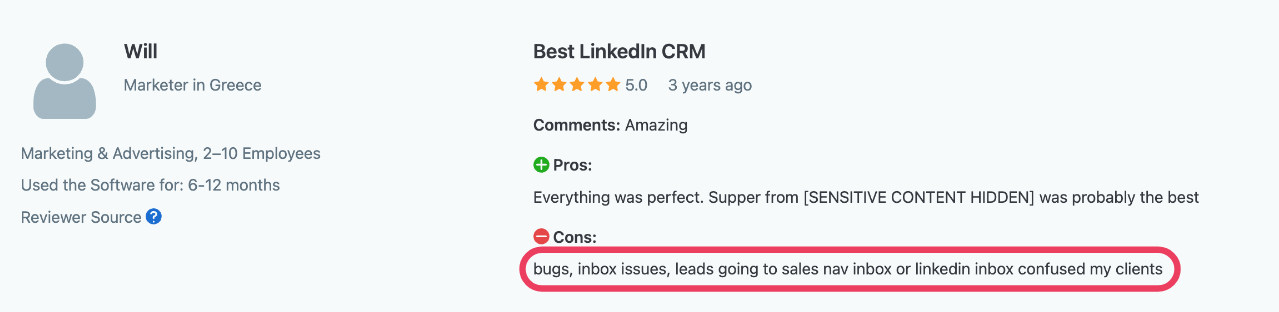
What are the Pros and Cons of using Skylead?

Skylead Pros
- LinkedIn Automation: Skylead offers solid LinkedIn automation, though you should know about the potential TOS concerns.
- Smart Sequences: You can personalize your outreach and build tailored campaigns based on how prospects engage.
- Good Customer Support: Skylead’s support team is quick and reliable at resolving issues.
Skylead Cons
- LinkedIn TOS Concerns: Like almost every LinkedIn automation tool, Skylead goes against LinkedIn’s terms of service, which can put your account at risk.
- Technical Bugs and Glitches: Bugs in the interface mean extra effort just to build campaigns
And, if you can't do the primary task of the tool with ease, you can imagine the roadblocks it'll throw
- Clunky User Interface: Building sequence steps isn’t as smooth as it should be. Even experienced users say the learning curve is steeper than expected.
- Limited Sales Nav Integration: It doesn’t work with LinkedIn inboxes for prospects you target through Sales Nav.
Be prepared to say hello to missed opportunities and poor response rates!
- Occasional Campaign Hiccups: Campaigns sometimes have trouble starting, which means extra troubleshooting in delivering your sales target!
Skylead may give you a few headaches. Make sure you carry an aspirin while you make campaigns lol.
With all of the odds stacked against, it wouldn't be a surprise if you're running around looking for a better alternative for your cold outreach needs.
But what if I told you, you don't have to go too far to find the #1 Skylead alternative?
In fact, you'll find your answer in the very next section…
SalesRobot - #1 Skylead alternative for sales outreach
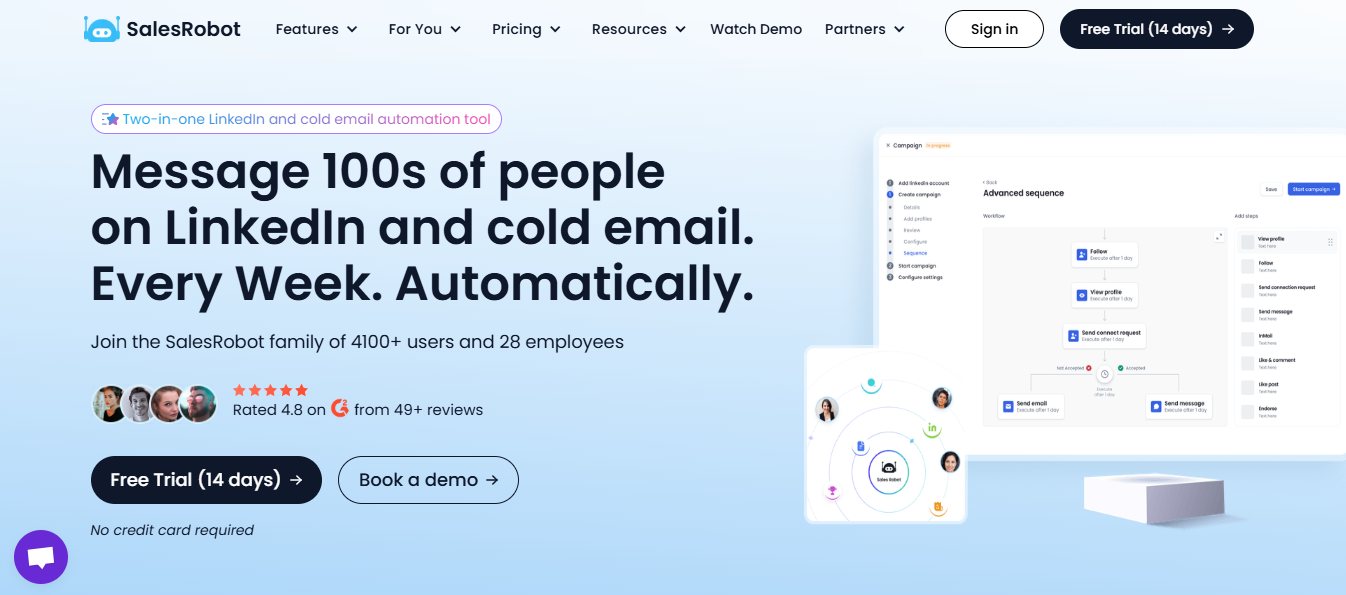
SalesRobot is a sales automation tool that helps you cut out the boring, repetitive tasks in your LinkedIn and email outreach.
You can also send tailored messages to each prospect to boost your response rate.
It's as personalized as owning your favorite team jersey with your name on it!
Additionally, SalesRobot features AI-powered message optimization that ensures higher engagement and response rates, helping you create more effective outreach campaigns automatically.
Let's see how SalesRobot is a better alternative.
Why choose SalesRobot over Skylead?

SalesRobot and Skylead are both sales engagement platforms for successful sales outreach, but SalesRobot stands out as a better alternative to Skylead due to the following features:
- SalesRobot has an easy-to-use UI and exceptional customer service.
- SalesRobot offers hyper-personalization and a smooth Sales Navigator integration for prospecting, which Skylead lacks.
- Skylead costs $100/seat/month with a 7-day free trial. SalesRobot starts at just $59/month with a 14-day free trial 🎉
- SalesRobot is easy to use and backed by 24/7 customer support.
Moreover, SalesRobot lets you build multi-step email sequences, add personalization, and even use AI to write or rewrite messages for maximum impact.
We may be Sales"Robot", but we're here to humanize the experience for you😊
.jpeg)
What are the main features of SalesRobot?
You may already have an idea of how good we are at what we do. Let's look at it in more detail, shall we?
These are SalesRobot's key features:
SalesRobot boosts your outbound sales efforts while saving time with automated email sequences.
LinkedIn automation with personalized interactions, and the advantage of bulk messaging, combine the two and you have a solid lead generation machine!

SalesRobot lets you pull prospects from LinkedIn/Sales Nav search URLs, LinkedIn posts, groups, events, and even custom CSV imports.
Additionally, it provides safe campaigns with configurable settings that can bypass LinkedIn's algorithm and round-the-clock customer service. (why fear when we're here for you 24/7!?)
Moreover, SalesRobot features AI-powered message optimization that ensures higher engagement and response rates, allowing you to build multi-step email sequences with AI-generated personalization that adapts to each prospect's profile.

SalesRobot provides a seamless experience with tailored follow-up plans, a user-friendly interface and integration with top CRMs like Hyperise and Zapier.

You also get robust reporting and analytics capabilities for real-time progress monitoring, sales campaign evaluation, and prospect insights.

But truth be told, I'm saving the best for last.
Because what if I told you, SalesRobot can auto-respond to your prospects, book meetings on your calendar with the dream customers, and create multichannel (LinkedIn + email) campaigns;
All on auto-pilot?
You might think it's impossible, but that's just a regular Tuesday for SalesRobot.
You can use the AI Variables feature while creating your campaign to start the process of automating your outreach entirely.
All you gotta do is pick your preferred message sequence (made by our experts), and let the AI work its magic. The AI will look at your leads profile, and draft personal messages accordingly

Now after your prospects respond to this message, our AI Appointment Setter will jump in and handle the conversation until the meeting is booked.
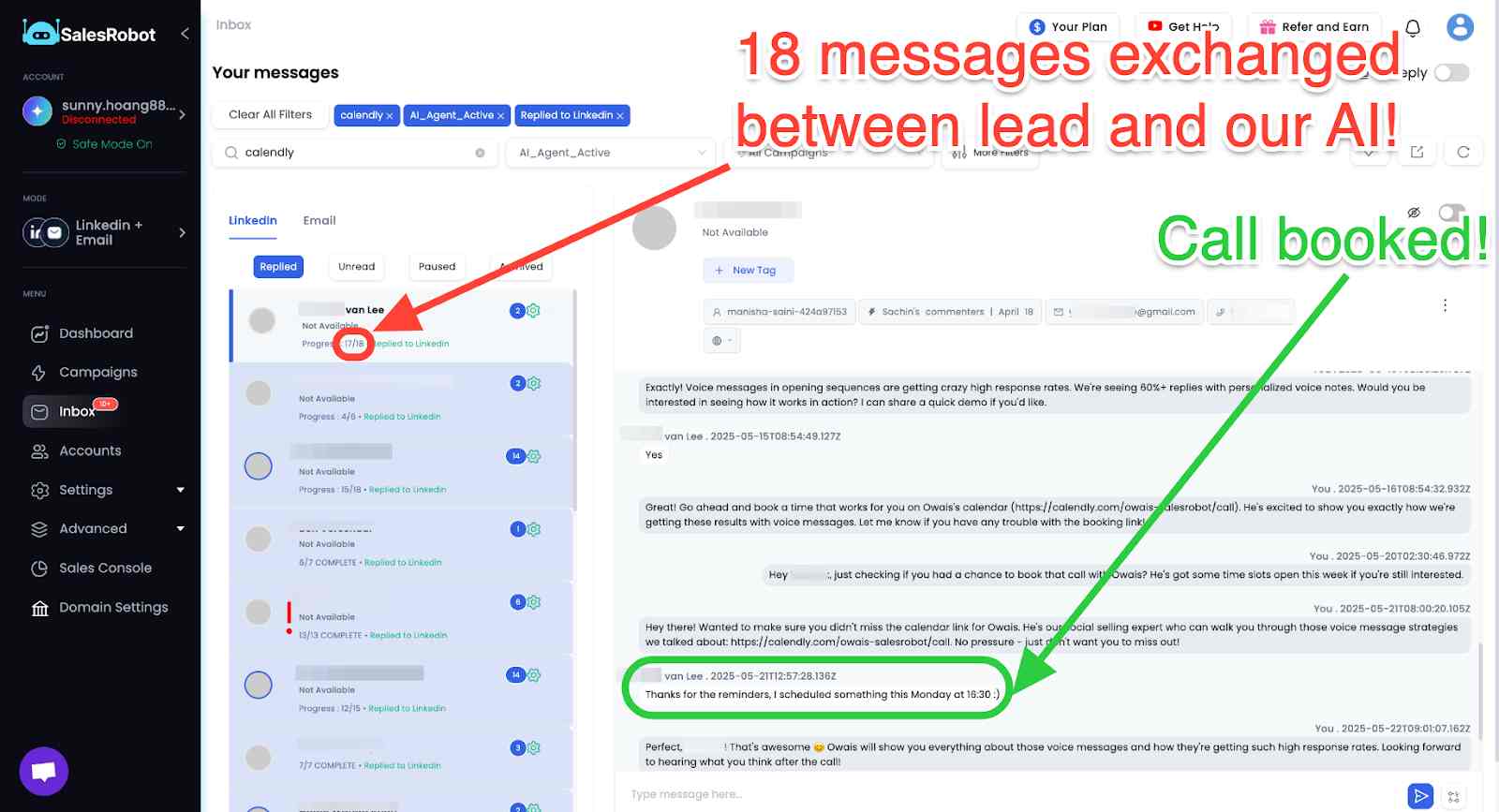
You know what's better than sending personalized text messages, though? Sending voice or video messages.
It'll make you stand out because your leads would be getting hundreds of texts in the LinkedIn DMs over the week.
SalesRobot also supports sending AI-personalized voice and video messages through LinkedIn DMs at scale — you can even clone yourself so each lead gets a personalized video. It's pretty easy: just click on the send Voice or Video message option while creating your campaign, and you're good to go. Users report 40%+ reply rates with voice note campaigns — and no other major LinkedIn tool offers this natively.

How much does SalesRobot cost?
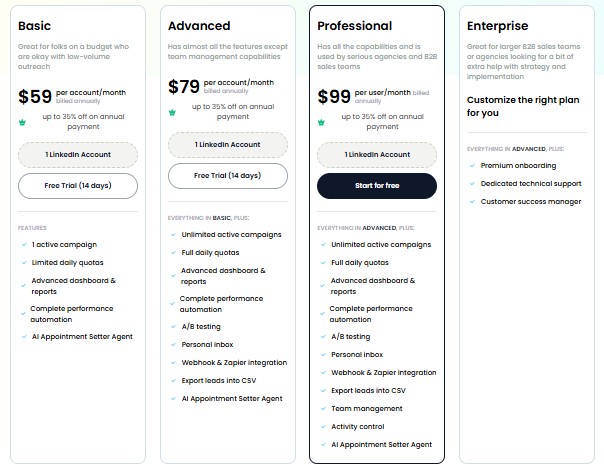
SalesRobot has three pricing plans: Basic at $59/month, Advanced at $79/month and Professional at $99/month.
The Basic plan includes access for one LinkedIn account and allows you to run one active campaign with limited daily quotas.
It comes with an advanced dashboard and reports to track performance, full performance automation, and access to an AI Appointment Setter Agent. This plan is ideal for individual users or small-scale outreach needs.
The Advanced plan also supports one LinkedIn account but offers unlimited active campaigns and full daily quotas, giving you more flexibility and higher volume outreach.
In addition to everything in the Basic plan, it includes features like A/B testing, a personal inbox, Webhook and Zapier integration, and the ability to export leads into CSV format. It's well-suited for users who need more control, customization, and integration options.
The Professional plan builds on the Advanced offering by adding team management and activity control features, making it perfect for teams managing multiple users or accounts.
You still get unlimited campaigns, full quotas, advanced reporting, automation, and all integrations along with the AI Appointment Setter Agent.
This plan is ideal for businesses that need centralized management and oversight of their outreach efforts.
Our annual subscription entitles you to an instant 20% discount.
If you want to test all of SalesRobot's services, you can benefit from a risk-free 14-day trial without giving your credit card information.
This enables you to evaluate whether Salesrobot meets your unique requirements.
{{mobile-cta}}
Frequently Asked Questions
Does Skylead have a free plan?
No. Skylead doesn't offer a permanent free plan — only a 7-day free trial with full access to the All-in-One features and no credit card required. After that, the single All-in-One plan is $100/month per LinkedIn account.
Is Skylead safe for my LinkedIn account?
Skylead is cloud-based with location-based IPs and human-like behavior, which lowers detection risk versus browser extensions. However, like all automation tools it violates LinkedIn's Terms of Service, so account restrictions remain possible. No LinkedIn automation tool is 100% risk-free.
Final thoughts on Skylead: Should you consider this tool?
As a sales expert, I understand the importance of automated sales outreach for effective lead generation and closing deals.
So, when comparing Skylead and SalesRobot, both tools offer LinkedIn and email automation, personalized connection requests, and campaign sequences.
While Skylead offers Smart Sequences, native CRM sync and a new AI SDR, SalesRobot stands out for its AI-personalized voice and video messages, lower starting price, longer free trial, and round-the-clock customer service..
Check out how SalesRobot helped Zuvelek score over $20,000 in new business in a couple of months!
If that did knock your socks off, go ahead and give SalesRobot a try today with a risk-free 14-day trial!!
I hope this Skylead review has been helpful. Happy prospecting!
Disclaimer: The content of this blog post reflects our own opinions and judgements based on our research and experience as of published date. Comparisons made to other software or tools are for informational purposes only and are based on publicly available information and our own analysis. We don't claim absolute accuracy and encourage readers to conduct their own research to form their own opinions. While we may discuss competitor offerings, our primary focus is to showcase the features and benefits of SalesRobot. SalesRobot isn't affiliated with any other software or tool mentioned in this blog post.

Wow your leads by cloning yourself and sending personalized videos and voice notes to each lead on LinkedIn.
If you don't reply to leads within 5 mins, your chances of converting them fall by 50%. Our AI replies on your behalf instantly! (and yes, you can train it)

Don't shoot in the dark. Get detailed analytics on what's working

SalesRobot allows you to invite other team members, so that they can add their LinkedIn Account, run outreach campaigns and get amazing results just like you.
.avif)


Trusted by 4100+ innovative B2B sales teams and lead gen agencies

.avif)

.avif)




.avif)


Heading 1
Heading 2
Heading 3
Heading 4
Heading 5
Heading 6
Lorem ipsum dolor sit amet, consectetur adipiscing elit, sed do eiusmod tempor incididunt ut labore et dolore magna aliqua. Ut enim ad minim veniam, quis nostrud exercitation ullamco laboris nisi ut aliquip ex ea commodo consequat. Duis aute irure dolor in reprehenderit in voluptate velit esse cillum dolore eu fugiat nulla pariatur.
Block quote
Ordered list
- Item 1
- Item 2
- Item 3
Unordered list
- Item A
- Item B
- Item C
Bold text
Emphasis

Superscript
Subscript